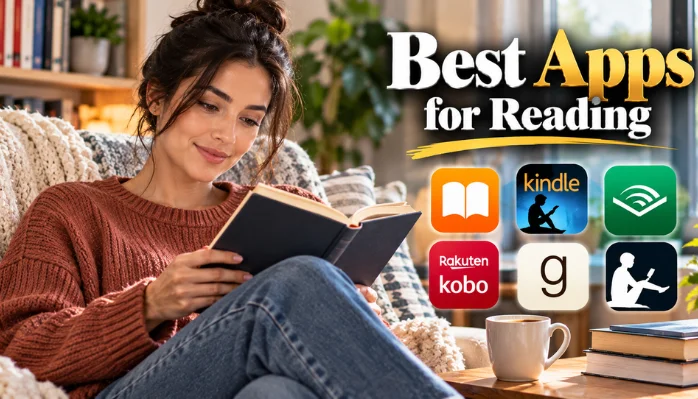
Finding the best apps for reading depends on what you read and how you get your books. Kindle is a strong all-around choice for purchased ebooks, while Libby stands out for U.S. library borrowing. Other apps offer better options for audiobooks, Apple devices, personal files, or reading statistics.
Quick answer: Kindle is a strong choice for buying and reading ebooks across devices. Libby is ideal for borrowing free ebooks and audiobooks with a participating U.S. library card. Apple Books works well for Apple users, while Google Play Books suits Android readers. Audible remains a useful choice for dedicated audiobook listeners.
Best Reading Apps at a Glance
| App | Best For | Platforms | Cost Model |
|---|---|---|---|
| Kindle | Overall ebook reading | iOS, Android, web, Kindle | Free app; books sold separately |
| Libby | Free library books | iOS, Android, web | Free with participating library |
| Apple Books | Apple users | iPhone, iPad, Mac | Free app; books sold separately |
| Google Play Books | Android users | Android, iOS, web | Free app; books sold separately |
| Kobo Books | Kindle alternative | iOS, Android, Kobo, web | Free app; books sold separately |
| Audible | Audiobooks | iOS, Android, web | Paid books and memberships |
| The StoryGraph | Tracking reading | iOS, Android, web | Free with optional paid plan |
| Hoopla | Library media | iOS, Android, web | Free through participating libraries |
| LibriVox | Public-domain audiobooks | Mobile and web | Free |
How We Chose These Reading Apps
A useful reading app should make books easier to access, organize, and finish. We focused on availability for U.S. readers, device support, library access, offline use, and reading features. We also considered whether each app fills a distinct role instead of duplicating another recommendation.
Price matters, but a free download doesn’t always mean free books. Kindle, Apple Books, Google Play Books, and Kobo sell digital titles through their respective stores. Library services such as Libby can provide books without individual purchases when your local library participates.
The right choice also depends on your existing devices and book collection. An iPhone owner may value Apple’s integration, while an Amazon customer may prefer Kindle syncing. Library users can often save more by checking Libby before buying a title.
1. Kindle: Best All-Around Ebook App
Amazon’s Kindle app gives readers access to a large commercial ebook ecosystem. Your reading position can sync between supported devices connected to the same account. That makes Kindle convenient if you switch between a phone, tablet, and Kindle e-reader. The app includes useful reading controls for fonts, text size, margins, themes, and other display settings. Readers can highlight passages and save notes without carrying a separate notebook.
Kindle also makes sense for people who already purchase most digital books through Amazon. One important consideration before committing to the platform is this. Kindle books are closely tied to Amazon’s ecosystem and supported by Kindle software. Readers who prioritize flexible personal files may prefer Google Play Books or another compatible reader.
Pros
- Large ebook marketplace
- Cross-device reading synchronization
- Adjustable reading settings
- Highlights, notes, and dictionary tools
- Works with Kindle e-readers
Cons
- Strong connection to Amazon’s ecosystem
- Most popular books require a purchase or eligible subscription
2. Libby: Best for Free Library Ebooks and Audiobooks
Libby connects readers with digital collections from participating public libraries. Sign in with an eligible library card, then borrow available ebooks, audiobooks, and magazines. Your library determines its catalog, loan periods, borrowing limits, and hold queues. For American readers, Libby has another useful feature.
You can send eligible borrowed ebooks from U.S. libraries to Kindle for reading. You can also read or listen directly inside Libby and download supported loans for offline use. Libby is especially useful if you read several books each month. Popular releases may have waiting lists, so it won’t replace a bookstore for every reader. Placing holds early can make the service much more useful over time.
Pros
- No charge for eligible library borrowing
- Ebooks, audiobooks, and magazines
- Offline reading and listening
- Kindle delivery for eligible U.S. library ebooks
- Adjustable reading controls
Cons
- Requires access to a participating library
- Popular titles can have long hold queues
3. Apple Books: Best for iPhone and iPad Users
Apple Books comes built around Apple’s hardware and services. It combines an ebook store, audiobook store, personal library, reading goals, and recommendations. Your progress can sync through iCloud across supported Apple devices. The app is particularly convenient for readers who already use an iPhone, iPad, or Mac. You don’t need a monthly subscription to use the store. You can buy individual ebooks or audiobooks whenever you want.
Its biggest weakness is also easy to understand. Apple Books makes the most sense when most of your devices come from Apple. Readers who regularly switch between Apple and Android hardware may find Kindle or Kobo more practical.
Pros
- Built for the Apple ecosystem
- Ebooks and audiobooks in one application
- iCloud progress syncing
- Offline downloads
- Reading goals and recommendations
Cons
- Less appealing for Android users
- Purchased content keeps you within Apple’s ecosystem
4. Google Play Books: Best for Android Readers
Google Play Books combines ebooks, audiobooks, comics, and manga in one service. Readers can download purchases for offline use and access their libraries across supported devices. Google also allows users to upload supported book files to their libraries. That upload option makes the app useful for people with an existing digital collection.
Custom shelves can help separate work material, fiction, reference books, or other categories. Notes can also sync with Google Drive, which may help students and researchers. You don’t need a recurring subscription to buy books through the service. Instead, you can purchase individual titles when needed. This approach suits occasional readers who don’t want another monthly payment.
Pros
- Strong Android integration
- Supports uploaded book files
- Ebooks and audiobooks
- Offline access
- No required monthly subscription
Cons
- Store purchases still add up for frequent readers
- Best experience favors Google’s ecosystem
5. Kobo Books: Best Alternative to Kindle
Kobo offers ebooks and audiobooks through its store and free reading application. The app supports phones and tablets, while Kobo e-readers provide a dedicated hardware option. Reading progress can sync between supported Kobo devices and applications. Customization is one of Kobo’s practical strengths. Readers can change fonts, spacing, margins, backgrounds, and other display settings.
The application also includes dictionary lookup and tools for managing a digital library. Kobo deserves consideration if you want an established ebook store without making Amazon the center of your library. Its dedicated e-readers make switching between mobile and e-ink screens straightforward. Store selection can still influence whether Kobo fits your favorite authors and genres.
Pros
- Dedicated Kobo e-reader integration
- Ebooks and audiobooks
- Flexible display settings
- Cross-device synchronization
- Established alternative to Amazon
Cons
- Smaller U.S. presence than Amazon
- Existing Kindle purchases won’t automatically transfer
6. Audible: Best for Dedicated Audiobook Listeners
Audible focuses on spoken books rather than traditional screen reading. Its apps provide playback controls, offline downloads, bookmarks, and listening-speed adjustments. The service works well for commuting, exercising, household tasks, or other screen-free situations. Its catalog includes mainstream releases, Audible-specific productions, and other audio content.
Membership options can suit listeners who finish books regularly. Occasional listeners should compare membership costs with buying individual audiobooks elsewhere. Audiobooks also complement ebook reading rather than replacing it. Some people read at home and listen while traveling or exercising. Combining formats can make finishing longer books easier without extending screen time.
Pros
- Large audiobook-focused catalog
- Offline listening
- Playback-speed controls
- Useful mobile listening experience
- Broad selection of genres
Cons
- Regular listening can become expensive
- Less useful for people who prefer reading text
7. The StoryGraph: Best for Tracking Your Reading
The StoryGraph differs from traditional ebook apps. It helps you record finished books, track progress, review reading statistics, and find recommendations. Readers can filter suggestions using factors such as mood, pace, and themes. The service also provides charts that show how your reading habits change.
You can create challenges, maintain lists, record private notes, and participate in buddy reads. Goodreads users can import reading data instead of rebuilding everything manually. StoryGraph doesn’t replace Kindle, Libby, or another reader. It works better as a companion that helps organize what you’ve read and what comes next. Data-minded readers may especially appreciate its statistics and filtering tools.
Pros
- Detailed reading statistics
- Mood-based discovery
- Reading challenges
- Goodreads import
- Free core service
Cons
- Not primarily an ebook reader
- Some advanced features require its paid Plus option
8. Hoopla: Another Useful Option for Library Readers
Hoopla provides digital media through participating public libraries. Depending on your library, available content can include ebooks, audiobooks, comics, music, movies, and television. That broader selection distinguishes it from services focused mainly on books. Access rules vary because each participating library controls its service arrangement. Your borrowing allowance and available catalog can therefore differ from another reader’s experience.
Check your library’s website before assuming Hoopla is included with your card. It can work well alongside Libby rather than replacing it. A title unavailable through one library platform may appear on the other. Checking both services before purchasing a book can potentially reduce your reading costs.
9. LibriVox: Best for Free Public-Domain Audiobooks

LibriVox focuses on audiobooks made from works in the public domain. Volunteers record these books and make the recordings available without normal audiobook purchase fees. The collection is especially useful for classic literature and older works. Recording quality can vary because narrators are volunteers rather than a single production team.
That variation may matter if professional narration is important to you. Still, the free catalog makes LibriVox useful for exploring classics without another subscription. Students can also use it to supplement assigned reading when an eligible book is available. Listening while following the printed text may help some readers stay focused. Check the specific recording before committing to a long title.
Which Reading App Should You Choose?
Start with where your books already come from. Kindle fits readers who regularly buy Amazon ebooks, while Apple Books suits Apple-centered households. Google Play Books and Kobo provide strong alternatives for readers outside those ecosystems. Library-card holders should install Libby before purchasing every book on their list.
Audiobook fans may want Audible, while classic literature listeners can check LibriVox first. The StoryGraph works alongside these services when tracking and discovery matter. You don’t need to limit yourself to one application. A practical setup might combine Libby for borrowing, Kindle for purchased ebooks, and StoryGraph for tracking. Choosing apps by purpose often works better than forcing one service to handle everything.
Best Apps for Reading: What Features Matter Most?
The best apps for reading should match your preferred format, devices, and book sources. Look for comfortable typography, offline downloads, reliable synchronization, and easy library organization. Audiobook users should also check playback speeds, sleep timers, and vehicle integration. Consider ownership and access before building a large digital collection.
A free reader may still connect you to a paid bookstore, while library apps lend rather than sell titles. Understanding that difference can prevent unexpected costs later. Accessibility settings deserve attention as well. Adjustable fonts, text sizes, backgrounds, and audio options can make longer sessions more comfortable. Try an app’s free version before moving a large collection into its ecosystem.
Build a Reading Setup That Fits Your Habits
The right reading setup doesn’t have to depend on one service. Start with the app connected to books you already own, then add a library option for free borrowing. A tracking service can help if you want goals, statistics, or better recommendations. U.S. readers with library cards should check their local digital collection before paying for another copy.
Frequent ebook buyers can compare Kindle, Kobo, Apple, and Google based on their devices. Once your apps match your habits, spending more time reading becomes simpler.
Frequently Asked Questions
What are the best apps for reading books in the US?
Kindle, Libby, Apple Books, Google Play Books, and Kobo cover most U.S. ebook needs. Audible is useful for audiobook-focused users, while StoryGraph helps track reading. Your strongest option depends on your devices, library access, and preferred book format.
What is the best free reading app?
Libby is an excellent free option if your public library participates in OverDrive. You need an eligible library card, and the library controls which titles are available. LibriVox is another free option for public-domain audiobooks.
Can I read library books on my phone?
Yes, participating U.S. libraries can offer ebooks and audiobooks through services such as Libby. You can read supported titles directly on a phone or tablet. Libby also supports offline downloads for many borrowed items.
Can Libby books be sent to a Kindle?
Eligible ebooks borrowed through participating U.S. libraries can be sent to Kindle. Not every digital loan necessarily supports the same reading options. Check the individual title’s available formats before borrowing.
Is Kindle or Apple Books better?
Kindle is more practical for readers who use several device platforms or already own Amazon ebooks. Apple Books offers tighter integration across supported Apple hardware. Your existing book purchases should influence the decision because switching ecosystems can be inconvenient.
Do I need to pay monthly for a reading app?
No, several major reading applications don’t require a monthly subscription. Apple Books and Google Play Books let you buy individual titles, while Libby uses participating library access. Paid memberships can make sense for frequent readers, but they aren’t required for digital reading.